Everything you need to know
before you dive in
Dozen Devs is a reciprocal testing community — testers earn Aura credits, developers get real verified testers. One rule applies to everyone: join the Google Group first.
First: Join the Dozen Devs Google Group
All testers and developers must be members of our main Google Group. This is how Google Play knows who is allowed to access closed-testing apps on the platform.
dozendevs@googlegroups.comJoin Group ↗Sign in with your Google account, click the link above, and click "Join group". It's free and takes 30 seconds. You won't receive spam — it's used for Play Store access only.
Choose your path
Most people do both — test to earn Aura, then spend it to get tested.
I want to test apps & earn Aura
- 1Join the Google Group
See the step above — required before you can access any test apps.
- 2Browse the catalog
Find an app that interests you and click Opt In. You start with 4 slots — you can test 4 apps at once.
- 3Accept the Play Store invite
After opting in, you'll get an email invite from Google Play. Accept it and install the app on your Android device.
- 4Upload a screenshot daily
Open the app, take a real screenshot, and upload it from your dashboard. Each approved screenshot earns you 100 Aura.
- 5Keep your streak going
Testing runs for 14 days. Stay consistent — 3 missed days in a row will drop you from the test. Your Aura stays.
I want to get my app tested
- 1Join the Google Group
Same requirement — you need to be a member of
dozendevs@googlegroups.comtoo. - 2Add the group to your Play Console
In Google Play Console, go to Testing → Closed testing → Testers tab. Select Google Groups and add:
dozendevs@googlegroups.comThis gives all Dozen Devs testers access to your app on the Play Store.
Google Play Console — Closed Testing → Testers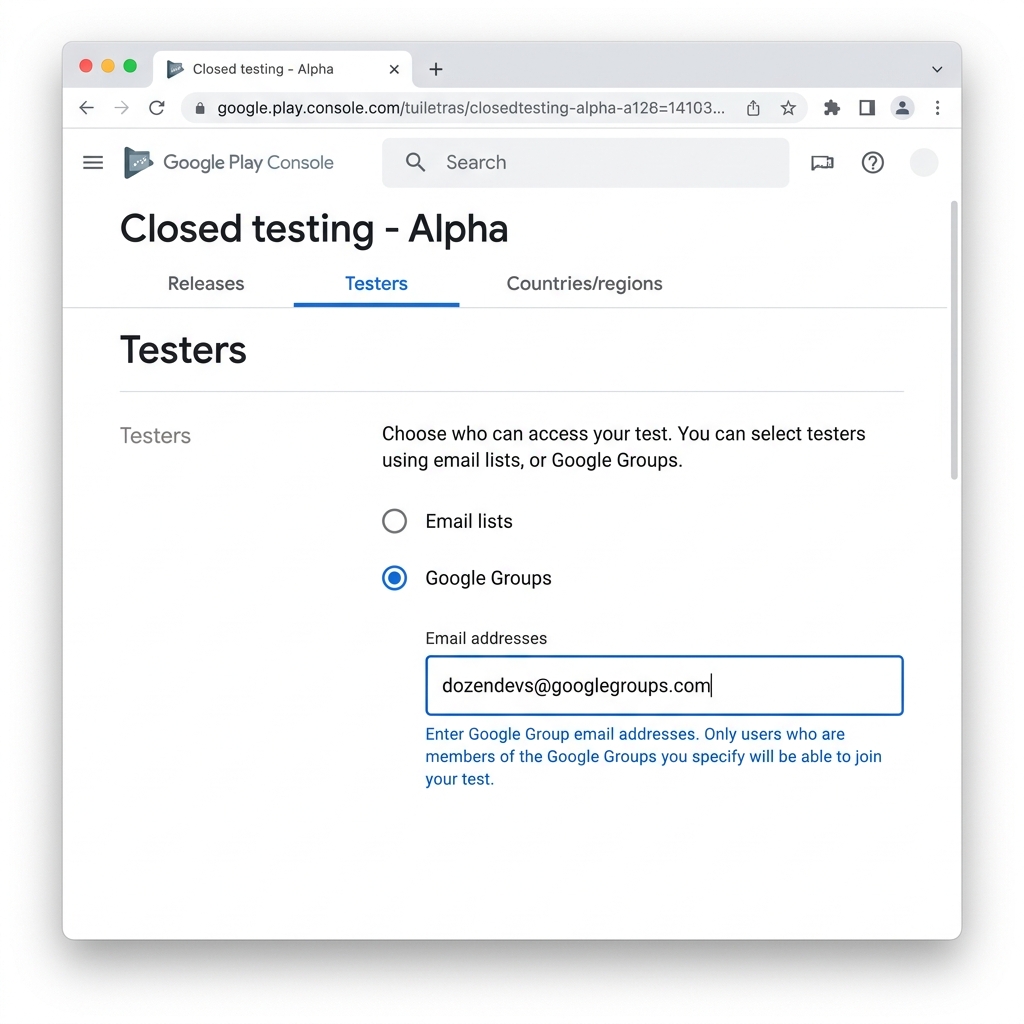
- 3List your app on Dozen Devs
Click List App, fill in the details, upload 2–5 reference screenshots, and pay the Aura listing fee.
- 4Wait for admin approval
We review every listing to keep the catalog genuine. Usually approved within 24 hours.
- 5Testers find you automatically
Your app appears in the catalog. Testers opt in, install, and upload verified screenshots daily — no chasing required.
Common questions
Do I need an Android device to be a tester?
Yes — you need an Android device to install the test apps and take screenshots.
How does screenshot verification work?
Every screenshot is checked automatically for the correct date (EXIF), that it's not a duplicate (perceptual hash), and that it matches the app visually (OCR + colour matching). No manual review needed.
What happens if I miss a day?
Nothing for one or two days. Three consecutive missed days will drop you from that test. Your Aura balance stays and you can opt into a new app.
Where does the Aura listing fee go?
It sits in escrow while your app is tested and is paid out to testers as they verify daily screenshots.
Can I do both — test apps AND list my own?
Absolutely — most people do. Test apps to earn Aura, then spend it to list your own. You start with enough Aura to list after just a couple of days testing.
Why the Google Group requirement?
Google Play uses Groups to control closed test access. Adding our group to your app means every member (every tester) automatically has permission to install your app without individual email invites.